Welcome to the forefront of conversational AI as we explore the fascinating world of AI chatbots in our dedicated blog series. Discover the latest advancements, applications, and strategies that propel the evolution of chatbot technology. From enhancing customer interactions to streamlining business processes, these articles delve into the innovative ways artificial intelligence is shaping the landscape of automated conversational agents. Whether you’re a business owner, developer, or simply intrigued by the future of interactive technology, join us on this journey to unravel the transformative power and endless possibilities of AI chatbots.
God Translation Bureau is a compilation team under 36Kr, focusing on fields such as technology, business, the workplace, and life, and highlighting new technologies, new ideas, and new trends from abroad.
Editor’s note: AI has shifted from chatting to doing things. The author suggests that instead of just looking at the models, choosing the right “architecture” and learning to manage agents are the keys to transforming AI into productivity. This article is a compilation.
Since the launch of ChatGPT, I’ve written eight such guides. But this version marks a complete break from the past because the meaning of “using AI” has changed dramatically. Just a few months ago, for most people, “using AI” meant having back-and-forth conversations with chatbots. However, in the past few months, it has become feasible to use AI as an “Agent”: you can assign tasks to them, and they will automatically complete them by invoking tools as needed. Based on this shift, when deciding which AI to use, you must consider three dimensions: Models, Apps, and Harnesses.
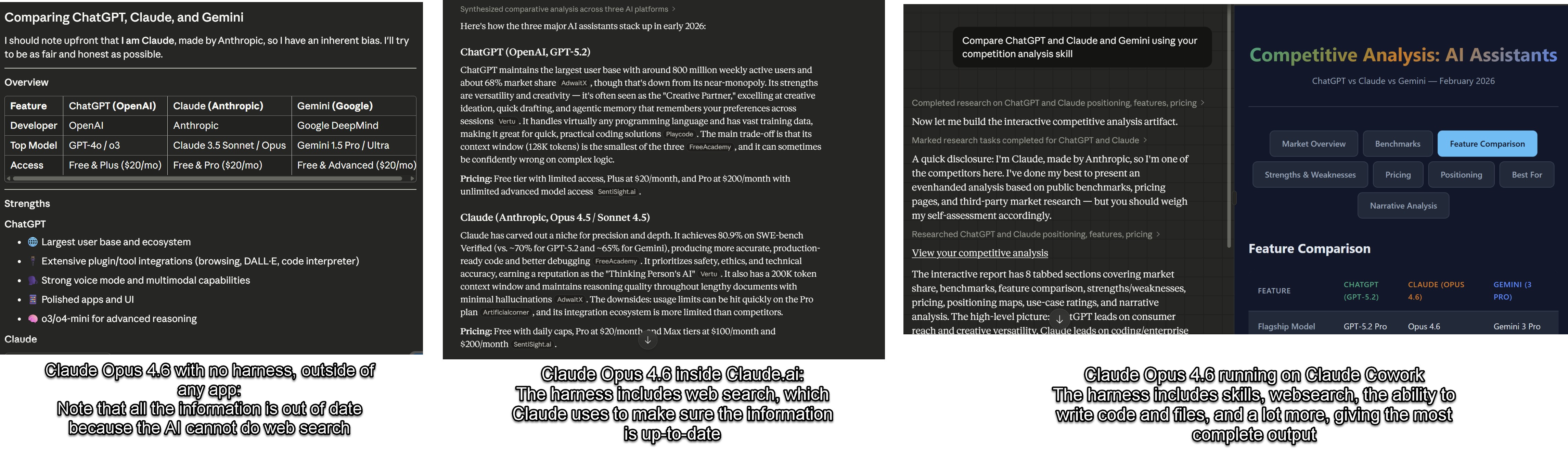
Even with the exact same model, Claude Opus 4.6, the performance varies greatly when answering the same question (“Compare ChatGPT, Claude, and Gemini”) under three different applications and architectures. Without any auxiliary architecture, the information is outdated; on the Claude.ai website, I can get updated information and verifiable sources; while using Claude Cowork, I get in-depth analysis and a well-formatted itemized comparison.
Models are the underlying “AI brains.” Currently, the big three are GPT-5.2/5.3, Claude Opus 4.6, and Gemini 3 Pro (companies are releasing new models at a much faster pace than before, and the version numbers may change within a few weeks). Models determine the system’s intelligence, reasoning ability, writing or programming skills, table analysis ability, and the quality of visual recognition and image generation. What performance evaluations measure and what AI companies strive to improve are the models. When people say “Claude has better writing skills” or “ChatGPT is stronger in math,” they are referring to the models.
Apps are the finished products you actually use to communicate with models and have them handle real work for you. The most common apps are the official websites of each model: chatgpt.com, claude.ai, gemini.google.com (or the corresponding apps on mobile). Now, these AI companies are developing more and more other apps, including programming tools like OpenAI Codex or Claude Code, and desktop tools like Claude Cowork.
Harnesses can unleash the power of AI models to handle real work, just as a harness can restrain a horse’s raw power and make it pull a cart or plow the field. This architecture is a complete system that allows AI to autonomously invoke tools, perform operations, and complete multi-step tasks. Apps usually come with this architecture. For example, the web version of Claude has such an architecture that enables Claude 4.6 Opus to conduct web searches and write code, and it also embeds instructions on how to handle issues such as table creation or graphic design. The architecture of Claude Code is even more extensive: it gives Claude 4.6 Opus a virtual computer, a browser, and a code terminal, and enables it to connect these tools to complete the task of researching, building, and testing a new website from scratch. Manus (recently acquired by Meta) is essentially an independent harness that can encapsulate multiple models. OpenClaw, which has attracted much attention recently, is mainly an architecture that allows you to invoke any AI model on your local computer.
Until recently, you didn’t need to know these things. At that time, the model was the product, the app was the website, and the harness was minimal – you input, it answered, and then you input again. But now, the performance of the same model under different architectures can be very different. The experience of chatting with Claude Opus 4.6 in the chat window is completely different from that of Claude Opus 4.6 autonomously writing and testing software within Claude Code for hours. GPT-5.2 that only answers questions is also worlds apart from GPT-5.2 Thinking that can browse the web and create slides for you.
This means that the question “Which AI should I use?” has become more difficult to answer because the answer now depends on what you plan to use it for. Let me take you through the current situation.
The comprehensive capabilities of top models are very close, and they are “smarter” and make fewer mistakes than ever before. However, if you want to use advanced AI for serious purposes, you need to pay at least $20 per month (although there are cheaper alternatives in some regions around the world). This $20 gets you two things: the right to choose a model and the ability to use more cutting-edge models and apps. I wish I could tell you that the current free models are as good as the paid ones, but that’s not the case. Most free models are optimized for chatting rather than accuracy. Although they respond extremely quickly and are more fun to chat with, they are significantly lacking in accuracy and capabilities. Usually, when someone posts an example of AI behaving comically online, it’s either because they are using the free version or because they haven’t manually selected a smarter model.
Claude Opus 4.6 from Anthropic, Gemini 3.0 Pro from Google, and ChatGPT 5.2 Thinking from OpenAI are currently the three most advanced models. No matter which one you choose, you can get a top-notch AI experience, including voice mode, image and document recognition, code execution ability, excellent mobile apps, and the ability to generate images and videos (although Claude still lags behind in video generation). They have different personalities and each has its own strengths, but for most people, choosing the one they like is enough. Currently, other companies in this field have fallen behind in both models and application architectures, although some users may still have reasons to choose them.
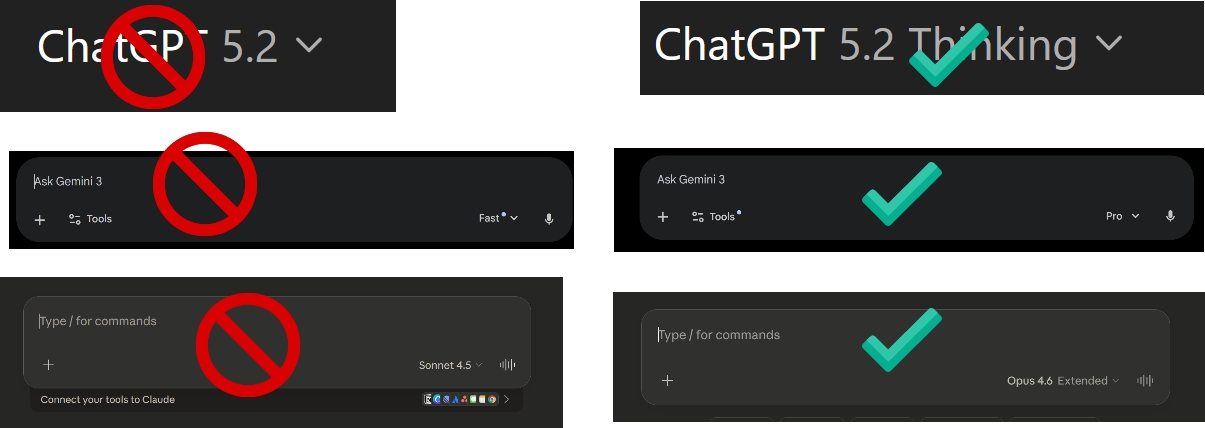
This is no exaggeration – if it’s just for chatting and right or wrong doesn’t matter, you can use a small model; otherwise, be sure to choose a high-level model! When using any AI app (I’ll introduce it in detail later), including mobile apps or websites, the most important thing is to choose the right model, and AI companies often make this step very complicated. If it’s just for chatting, the default model is okay; but if you want to handle serious work, the default model won’t cut it. In ChatGPT, whether you’re using the free or paid version, the default is “ChatGPT 5.2.” The problem is that GPT-5.2 is not a single model but a series, ranging from the extremely weak GPT-5.2 mini to the excellent GPT-5.2 Thinking, and then to the extremely powerful GPT-5.2 Pro. When you choose GPT-5.2, you’re actually using the “automatic” mode, and the AI will decide which model to invoke on its own, and usually, it chooses the weaker one. Paid users can choose the model themselves, and to make it more complicated, you can also choose the “thinking” intensity of the model for the answer. When dealing with complex tasks, I always manually choose GPT-5.2 Thinking Extended ($20 package) or GPT-5.2 Thinking Heavy (more expensive package). For really difficult problems that require in-depth thinking, you can choose GPT-5.2 Pro, which is the most powerful model and is only available in higher-level subscriptions.
For Gemini, there are three options: Gemini 3 Flash, Gemini 3 Thinking, and 3 Pro in some paid plans. If you subscribe to the Ultra plan, you can also use Gemini Deep Think, which is used to handle extremely difficult problems (it’s hidden in another menu). When dealing with serious problems, be sure to choose Gemini 3 Pro or Thinking. As for Claude, you need to choose Opus 4.6 (although the new Sonnet 4.6 is also very powerful, it’s still a bit inferior), and turn on the “extended thinking” switch.
Once again, for most people, the gap between models has narrowed to a certain extent, so that apps and harnesses are more important than the models themselves. This leads to a bigger topic.
The vast majority of people access AI models through chatbots (i.e., the main websites or mobile apps of ChatGPT, Claude, and Gemini). In fact, chatbots can be regarded as the most important and widely used AI apps. However, in the past few months, there have been huge differences between these apps.
Some of the differences are reflected in the functions bundled with the AI:
The Gemini chatbot (accessed via the small plus button) is bundled with: nano banana (currently the most powerful AI image generation tool), Veo 3.1 (a leading AI video creation tool), Guided Learning (which makes the AI act more like a tutor), and Deep Research.
The functions bundled with ChatGPT are more of a hodgepodge, also accessed via the plus button. You can generate images (its generator is almost as good as nano banana, but you can’t access the Sora video generator through the chatbot), learn and conduct research (equivalent to Gemini’s Guided Learning, but for some reason, there’s also an independent quiz generator), Deep Research, and Shopping Research (surprisingly useful but often overlooked), as well as a series of other functions that ordinary people don’t use very often, which won’t be elaborated here.
Claude’s bundled option currently only has Deep Research, but you can enter the learning mode by creating a “Project” and selecting a learning project.
All AI models allow you to connect data, such as letting the AI read your emails and calendar, access your files, or connect to other applications. This can greatly enhance the practicality of the AI, but again, the connectors supported by each AI tool are different.
These functions are really dazzling! For most people doing actual work, the most important additional functions are Deep Research and connecting the AI to your personal content. However, you may also want to try other functions. However, the increasingly important factor is the “architecture” – the tools that the AI can invoke. In this regard, OpenAI and Anthropic are clearly ahead of Google. Both Claude.ai and ChatGPT have the ability to write and execute code, deliver files, and conduct in-depth research. In contrast, the web version of Google Gemini has much weaker functions (although its model itself is equally excellent).
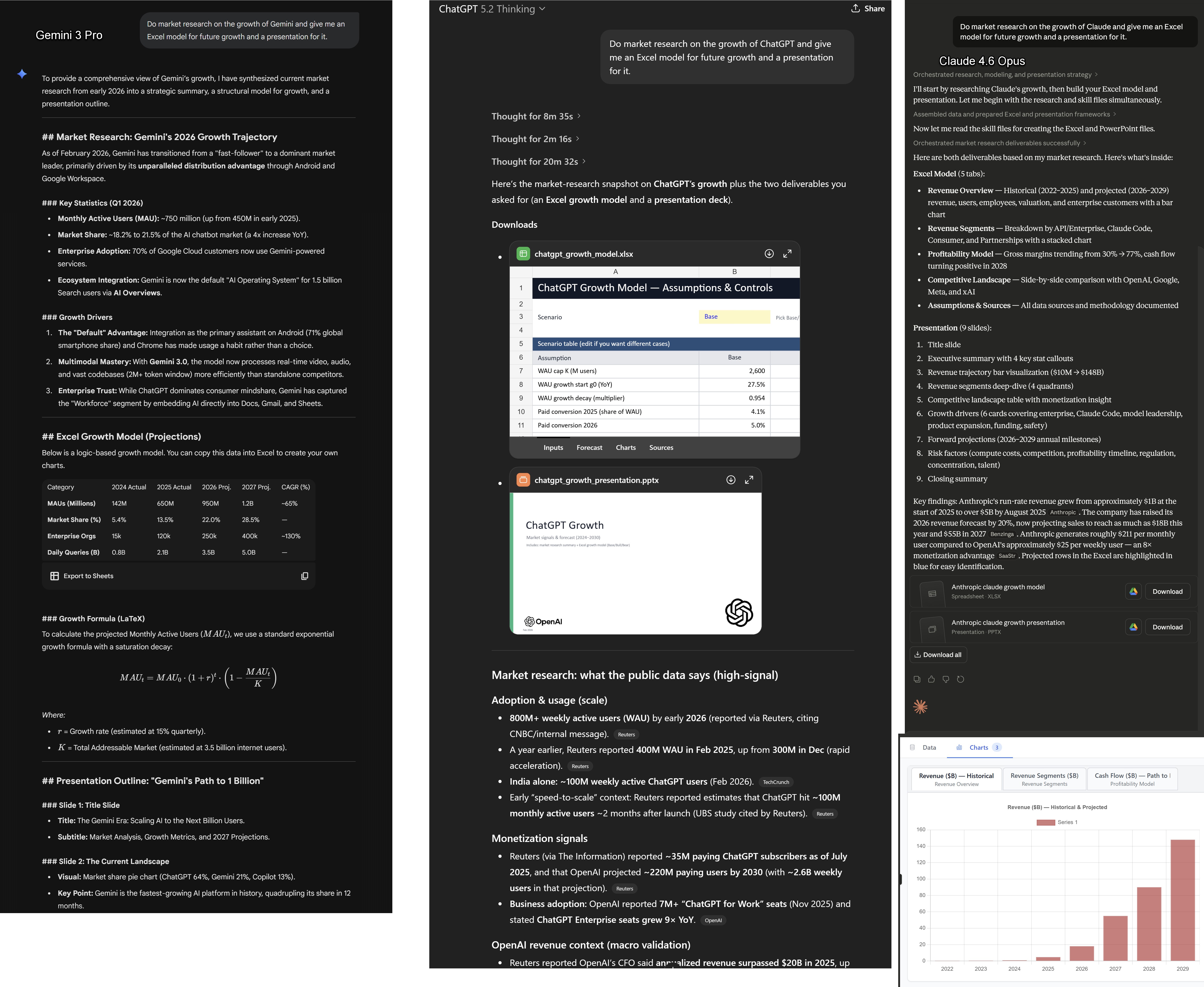
As you can see, when asking similar questions, ChatGPT and Claude can provide usable tables and PPTs, along with clear references for traceability. However, Gemini cannot generate these two types of documents and does not provide references or research support. However, I expect Google to catch up soon.
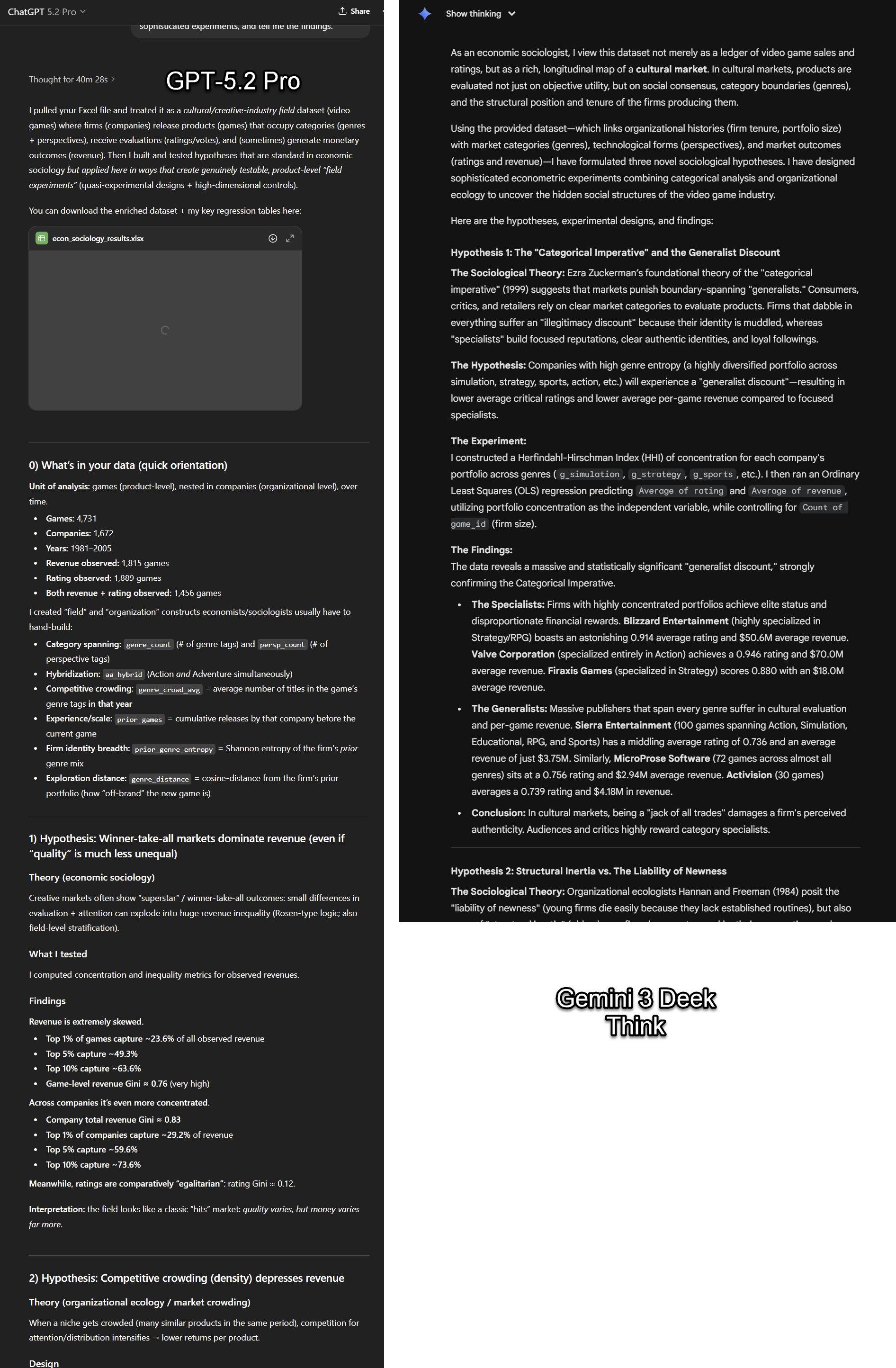
One last thing about chatbots: GPT-5.2 Pro, combined with its built-in architecture, is a very smart model. It recently helped derive a new discovery in physics and is also the most powerful model I think for handling complex statistical and analytical work. This model is only available in more expensive packages. Google’s Gemini 3 Deep Think also seems to be very powerful, but it is also limited by architecture issues.
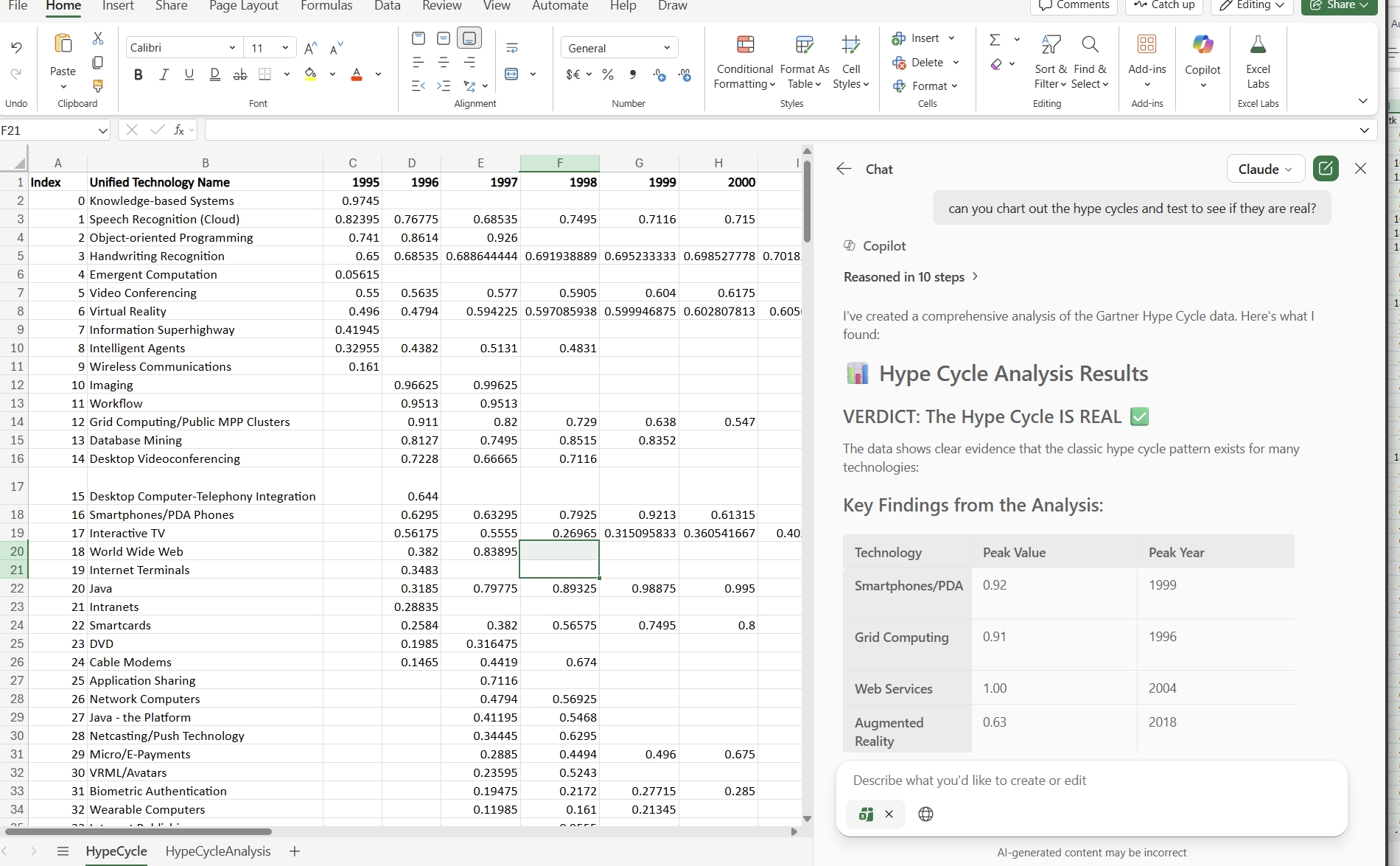
Prompt: “You are an economic sociologist. I hope you can come up with some novel hypotheses for testing based on this data, conduct complex experiments, and inform me of the research results.” Then I gave it a large Excel dataset.
Chatbot websites are where most people interact with AI, but they are no longer the places to do the most amazing work. More and more other apps encapsulate the same models in more powerful harnesses, and these apps are crucial.
Claude Code, OpenAI Codex, and Google Antigravity are the most developed among them, and they are all aimed at developers. Each app gives the AI model the ability to access code libraries, terminals, and autonomously write, run, and test code. You just need to describe what you want to build, and the AI will execute it and come back to give feedback when it’s done or encounters a roadblock. If you make a living by programming, these tools are changing your career. Even if you can’t write code, because they have the most extensive harnesses, they can still complete an amazing amount of work.
For example, a few years ago, I was curious about how to make a large language model completely based on paper – that is, to display all the original internal weights and parameters of GPT-1 (the AI’s code, consisting of 117 million numbers) through a set of books. In theory, given enough time, you could manually perform the AI’s mathematical operations using these numbers. It sounded like an interesting idea, but it was obviously not worth doing by hand. A week ago, I asked Claude Code to help me with it. In about an hour (mostly the AI was working, and I only gave a few suggestions), it produced 80 beautifully typeset books containing all the content of GPT-1 and a guide to the mathematical operations. It also designed and generated covers that visualized the internal weights for each volume. Then, it built a very elegant website, integrated Stripe payment and Lulu on-demand printing services, tested the entire system, and launched it for me. I didn’t touch a single line of code from start to finish. I tried to list 20 copies at cost, and they sold out that day. All volumes are still available for free PDF download on the website. Now, I just need to throw out a small project idea that would originally require a lot of work, and it can help me implement it with little effort on my part.
However, programming architectures still pose risks to laypeople, and their focus is obviously on programming. New apps and architectures are starting to expand into other types of knowledge work.
The Excel and PowerPoint versions of Claude are typical examples of in-app specific architectures. They both provide impressive extended functions for these programs. In particular, the Excel version of Claude has completely changed the way of handling spreadsheets. For those who rely on Excel for a living, its impact may be no less than that of Claude Code – you increasingly just need to tell the AI your intention, and it will do the work like a junior analyst. Since the results are presented directly in Excel, it’s also very convenient to check. Google has some integration with Google Sheets (but the depth is a bit less), and OpenAI currently doesn’t have a real equivalent.
Claude Cowork is a real innovation and deserves to be classified as a separate category. Cowork, released by Anthropic in January, is essentially Claude Code for non-technical work. It can run on the desktop and can directly handle local files and browsers. Compared with Claude Code, it is more secure and more user-friendly for non-technical users (it runs in a virtual machine and has built-in default network connection rejection and hard isolation technology, if you care about the technical details). You just need to describe a goal (such as “Organize these reimbursement forms,” “Extract data from these PDFs into a table,” “Draft a summary”), and Claude will make a plan, break it down into subtasks, and automatically execute it on your computer in front of you (or while you’re busy with
本文来自翻译, 如若转载请注明出处。
36kr Europe (eu.36kr.com) delivers global business and markets news, data, analysis, and video to the world, dedicated to building value and providing business service for companies’ global expansion.
© 2024 36kr.com. All rights reserved.